apk.cafe
Best apps for your Android

Hi, There you can download APK file "ApowerMirror" for Android free, apk file version is 1.8.34 to download to your android device just click this button. It's easy and warranty. We provide only original apk files. If any of materials on this site violates your rights, report us
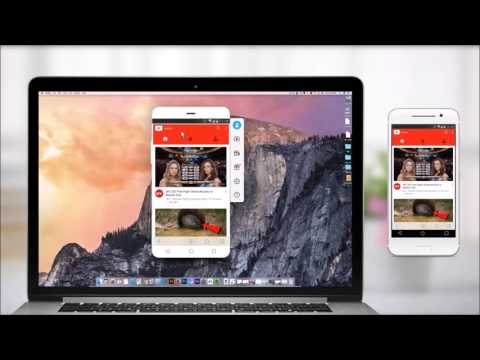
Screenshots of ApowerMirror- Screen Mirroring

  • ApowerMirror- Screen Mirroring
  • ApowerMirror- Screen Mirroring
  • ApowerMirror- Screen Mirroring
  • ApowerMirror- Screen Mirroring
  • ApowerMirror- Screen Mirroring
  • ApowerMirror- Screen Mirroring
  • ApowerMirror- Screen Mirroring
  • ApowerMirror- Screen Mirroring
  • ApowerMirror- Screen Mirroring
  • ApowerMirror- Screen Mirroring
  • ApowerMirror- Screen Mirroring
  • ApowerMirror- Screen Mirroring
  • ApowerMirror- Screen Mirroring

Description of ApowerMirror- Screen Mirroring (from google play)

ApowerMirror is a wireless screen mirroring app that can be used to cast Android phone to PC, Mac, Smart TV (TV box) with AUDIO. It allows you to mirror&control one Android device to another Android device freely, and you can remotely control Android from PC or Mac with your mouse and keyboard. Besides, streaming the mirrored screen to applications like OBS Studio or Zoom becomes easier.

The app needs to be used with the desktop program. Get ApowerMirror Desktop Program here: https://www.apowersoft.com/phone-mirror

Key Features:

🏆Mirror Android to PC and Vice Versa

ApowerMirror allows you to cast Android to PC with audio. No need for an AUX cable, it can truly achieve audio and video synchronization while screen mirroring. Using this, you can freely stream videos, display apps, share meeting contents, or play Android games from PC or Mac in full-screen mode. Besides, you can display your PC screen on your phone and control it from your phone. With that, you can access all files on your computer and even use PC programs on your phone with no hassle.

🏆Mirror&Control Phone from Phone

ApowerMirror is also a good screen mirroring app to mirror phone to phone or tablet. You can also share your screen with another phone using ApowerMirror to watch videos and movies with your friends and share your files with your audience easily.

🏆Accessibility APl

ApowerMirror requires "Accessibility" permission to help you use the reverse control feature. This feature allows you to better help your family and friends debug their phones, and in corporate meetings, you can control your phone for demonstrations efficiently. Denying the accessibility permission will prevent you from using the reverse control-related functions, and will not affect the use of other features.

🏆Cast Phone to TV

This screencasting app also does well in screen mirroring Android to TV. Whether you want to stream movies, watch videos, share photos or play games right on the big screen, it just takes a few taps to mirror your phone's display to your TV. It supports TVs like Sony TV, LG TV, Philips TV, Sharp TV, Hisense TV, Xiaomi MI TV, and other TVs running Android OS.

🏆AirCast - Screen Mirror Between Different Networks

This advanced feature allows screen mirroring between devices that cannot be connected to the same network. If you use this feature, even if you are located in different places and on different network connections, you can share the screen with each other. This can be used to mirror phone to phone, cast phone to PC, and stream PC to phone.

🏆Control Android from PC/Mac

When screen mirroring Android to PC/Mac, you can take full control of the screen with your mouse and keyboard. Therefore, you are able to share PPT to your colleagues, enjoy movies on a bigger screen, or play phone games such as Mobile Legends, PUBG Mobile, Fortnite, Minecraft, and other games on the computer.

🏆Multi-screens on One Computer

ApowerMirror supports mirroring 4 devices simultaneously without delay, which greatly improves the efficiency of your daily life. With this tool, you can enjoy different screens at the same time and stop switching from one app to another.

Suitable for Various Screen Mirroring Occasions:

*Personal use☑️

*Business meeting☑️

*Online class /Education☑️

*Live streaming for mobile games☑️

*Movies/Sports video mirroring☑️

*Presentation☑️

*Work from home☑️

……

👇Supported Devices:

1. Windows & Mac
2. Android & iOS
3. Smart TV: Sony, Sharp, Philips, Hisense, Skyworth, Xiaomi, LG etc.
4. Devices with built-in DLNA or AirPlay protocol. Some projectors and car screens.

📢Feedback:

1. Contact us at support@apowersoft.com
2. Send feedback from "Settings" > "Feedback" on the ApowerMirror desktop program.
Official Website: https://www.apowersoft.com/phone-mirror
Discord: https://discord.gg/dK7y8Sf3Re

What's new in ApowerMirror- Screen Mirroring

New in ApowerMirror 1.8.29
Some fixes and improvements
Please rate this app

ApowerMirror- Screen Mirroring Version History: APK Size & Android Support

Explore the version history of ApowerMirror- Screen Mirroring for Android and see how the app has evolved over time. This section tracks versions added to the apk.cafe catalog, including download size, declared permissions, and Android compatibility. Select a time period or a point on a chart to explore historical version data.

ApowerMirror- Screen Mirroring Catalog Statistics

ApowerMirror- Screen Mirroring Versions Added by Quarter

Q3 20261 version added
New versions in the catalog

1 new ApowerMirror- Screen Mirroring version was added to the apk.cafe catalog in 2026. The catalog contains 53 versions dating back to June 2019.

ApowerMirror- Screen Mirroring Download Size History

1.8.34Sep 24, 202661.56 MB APKS: 38.96 MB base + 22.6 MB split parts
APKAPKS (split APK)

The ApowerMirror- Screen Mirroring download size for most phones increased from 26.54 MB in version 1.5.8.7 (2019) to 61.56 MB in version 1.8.34, a 132% increase. 7 of 53 versions in the catalog are APKS (split APK), starting with version 1.7.32 (April 2021).

ApowerMirror- Screen Mirroring Permissions History

1.8.34Sep 24, 202635 permissions
Permissions declared by the version

ApowerMirror- Screen Mirroring 1.8.34 declares 35 permissions, 2 more than version 1.5.8.7 from 2019 (33).

ApowerMirror- Screen Mirroring Android Compatibility History

1.8.34Sep 24, 2026Android 6.0+, built for 15
Requires (minimum Android)Built for (target Android)

ApowerMirror- Screen Mirroring 1.8.34 requires Android 6.0 or newer and is built for Android 15; version 1.5.8.7 from 2019 ran on Android 5.0 or newer.

Older versions of ApowerMirror- Screen Mirroring. The apk.cafe catalog has 53 versions of ApowerMirror- Screen Mirroring, from 1.5.8.7 (Jun 2019) to ApowerMirror- Screen Mirroring 1.8.34 (Sep 24, 2026). If the latest version has a bug, changed something you rely on or does not work on your phone, you can install an earlier one from the list of older ApowerMirror- Screen Mirroring APK versions below.

Version 1.8.34 needs Android 6.0 or newer. On older phones: Android 5.0 runs up to version 1.8.28 (Aug 2025).

Android does not install an older version over a newer one, so uninstall ApowerMirror- Screen Mirroring first. This usually deletes the app's data on the phone, so back up anything you need.

Dates show when each version was added to the apk.cafe catalog. Size is the full download for most phones (APK and split parts); permissions are for the same build.

ApowerMirror- Screen Mirroring 1.8.34 permissions

Has high-risk permissions: Accessibility service +335

Worth knowing

  • Accessibility serviceCan see and control what is on the screen. Turn it on only if you trust the app.
  • Shows over other appsCan draw on top of other apps. You can turn it off in Settings, Apps, Special app access.
  • Access to all filesCan read and change all files in the phone storage, not only its own.
  • Own keyboardA keyboard sees everything you type in it, including passwords. Use it only if you trust the app.
  • Uses your advertising IDFor personalised ads and ad measurement. You can reset or delete it in Settings, Privacy, Ads.
  • In-app purchasesMay offer paid content through Google Play.
Asks firstShow the list (9)
  • Cameratake pictures and videos
  • Microphonerecord audio
  • Phoneread phone status and identity
  • Photos and videosread image files from shared storage Android 13+, read video files from shared storage Android 13+
  • Music and audioread audio files from shared storage Android 13+
  • Filesread the contents of your shared storage up to Android 12L, modify or delete the contents of your shared storage
  • Notificationsshow notifications Android 13+
Special accessShow the list (2)
  • All files access Android 11+Can read, change and delete all files in the phone storage.
  • Display over other appsCan appear on top of other apps or other parts of the screen. This may interfere with normal app usage.
Granted automaticallyShow the list (24)
  • add you to ad audiences (Android ad services)
  • allow Wi-Fi Multicast reception
  • ask to ignore battery optimizations
  • change network connectivity
  • change your audio settings
  • connect and disconnect from Wi-Fi
  • control flashlight up to Android 6.0
  • control vibration
  • disable your screen lock
  • get ad topics based on your app use (Android ad services)
  • have full network access
  • in-app purchases through Google Play
  • install shortcuts
  • learn how the app was installed (install referrer)
  • measure ad clicks and installs (Android ad services)
  • prevent phone from sleeping
  • read Google services configuration
  • run foreground service Android 9+
  • run foreground service with the type "connectedDevice" Android 14+
  • run foreground service with the type "mediaProjection" Android 14+
  • run foreground service with the type "microphone" Android 14+
  • use the advertising ID (Android ad services)
  • view network connections
  • view Wi-Fi connections

Hardware

Made for devices with: Rear camera

Permission changes

Changes since 1.8.29.

Added in this version

  • add you to ad audiences (Android ad services)
  • get ad topics based on your app use (Android ad services)

More info

Advertisement

ApowerMirror- Screen Mirroring Older APK Versions for Android

Similar apps

Popular android apps